Redact a UK passport copy online
Hide the 9-digit passport number, machine-readable zone, date and place of birth and signature on a UK passport photo page, privately in your browser.
Drop files here
or paste a screenshot with Ctrl+V
PNG, JPG, WebP PDF up to 50 pagesMax 25 MB eachUp to 20 files at once
Processed on your device. Your file is never uploaded.Prove it
Pick a document to hide its fields in one click.
Detected items are covered right away. You can still uncover any of them.
Runs on your device. Downloads a 19 MB model once.
ID photos, selfies, people in screenshots. Runs on your device.
Balanced
Recommended. Catches most things without much noise.Before and after
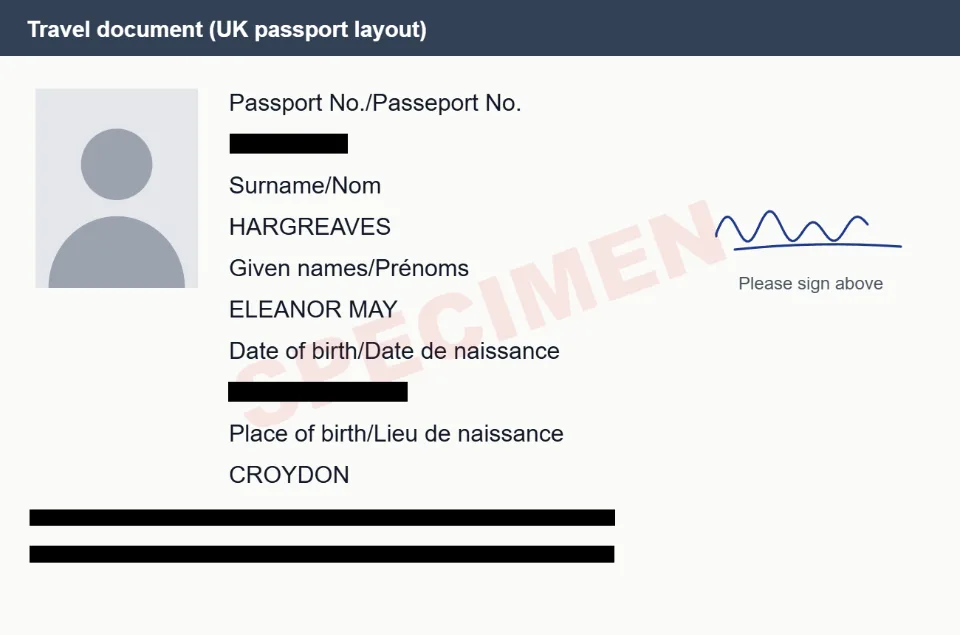
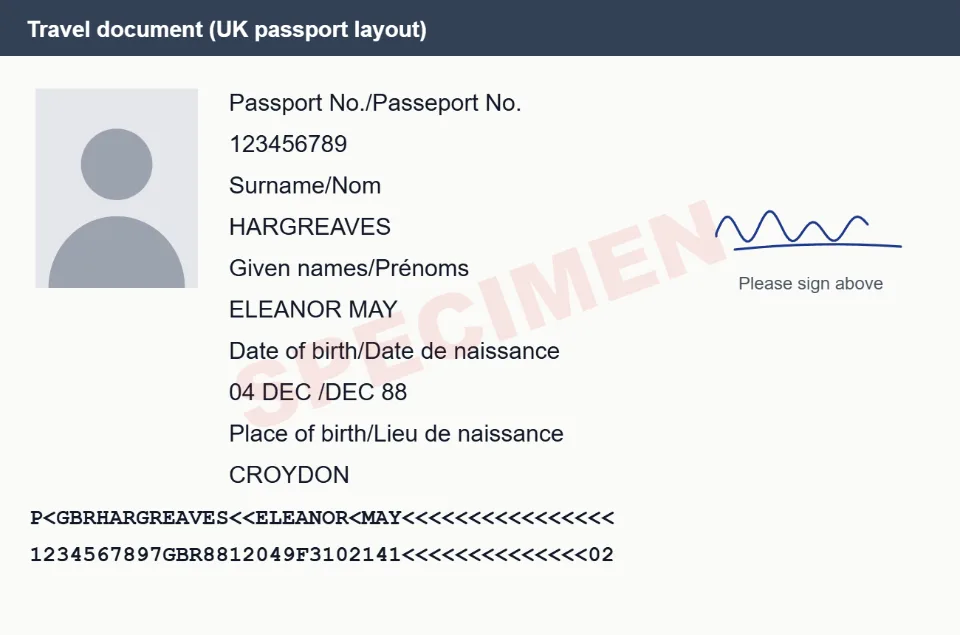
What gets hidden on your UK passport
- Passport number
- Machine-readable zone (MRZ)
- Date of birth
- Place of birth (optional)
- Name (optional)
- Issue and expiry dates (optional)
- Signature (optional)
- Photo (optional)
Ticked fields are covered as soon as your file opens. Tick or untick any of them, or draw a box over anything else.
How it works
- Drop a photo, scan or PDF of your UK passport above.
- Its text is read on your device, and the fields you ticked are covered with solid boxes.
- Check the result, then download a safe copy. The file is checked again for anything still readable.
Questions
The labels on my passport are in English and French. Does that matter?
No. The English labels are used to find each value, and the French part of the label is skipped, so the value itself is covered.
Is hiding the printed number enough?
No. The machine-readable zone at the bottom repeats your passport number, name and date of birth, so keep MRZ ticked whenever you hide the number.
Other documents
- Aadhaar cardHides: Aadhaar number, Virtual ID (VID), QR code, Phone number
- PAN cardHides: PAN, Date of birth, QR code
- PassportHides: Passport number, Machine-readable zone (MRZ), File number, Date of birth, Address
- Driving licenceHides: Licence number, Date of birth, Address, QR code
- Voter ID (EPIC)Hides: EPIC number, Address, Date of birth
- ChequeHides: Bank account number, MICR line (bottom of the cheque)
- Bank statementHides: Bank account number, Customer ID / CIF, Address, Email, Phone number, UPI IDs, Card numbers
- Salary slipHides: PAN, UAN, PF number, ESI number, Bank account number
- UPI payment screenshotHides: UPI ID, Phone number, Transaction / UTR number, Bank account number, Email
- Credit / debit cardHides: Card number, Expiry date, CVV
- ID card (any)Hides: ID numbers, Date of birth, Phone number, Email, Address, QR code
- Utility billHides: Consumer / account number, Meter number, Phone number, Email
- Bank passbookHides: Bank account number, CIF / customer ID, Nominee, Phone number, Email
- Form 16Hides: PAN (yours and the employer's), Your name and address
- GST certificateHides: GSTIN, Business address
- InvoiceHides: Customer name, Address, Email, Phone number, Tax IDs (GSTIN, VAT, EIN), Bank details, Card numbers
- Resume / CVHides: Name, Email, Phone number, LinkedIn, GitHub and website links, Address, Date of birth, Photo
- Medical reportHides: Patient name, Patient ID / MRN / UHID, Date of birth, Phone number, Email, Address, Insurance / policy number
- Driver's license (US)Hides: License number, Date of birth, Address, Document discriminator (DD)
- Social Security cardHides: SSN
- W-2 formHides: Social Security number, Your name and address, Control number
- Ration cardHides: Ration card number, Aadhaar numbers, Address, Phone number
- MarksheetHides: Roll number, Enrolment / registration number, QR code
- Property documentsHides: PAN, Aadhaar numbers, Phone number, Email, Photo, Signature
- ITR acknowledgement (ITR-V)Hides: PAN, Acknowledgement number, Address, Aadhaar numbers, Email, Phone number
- EPF passbookHides: UAN, Member ID / PF account number, Date of birth
- Birth certificateHides: Registration / certificate number, Address, Aadhaar numbers, QR code
- Insurance policyHides: Policy number, Customer / proposal number, Nominee, Date of birth, Address, Phone number, Email, PAN
- SIN (Social Insurance Number)Hides: Social Insurance Number, Address